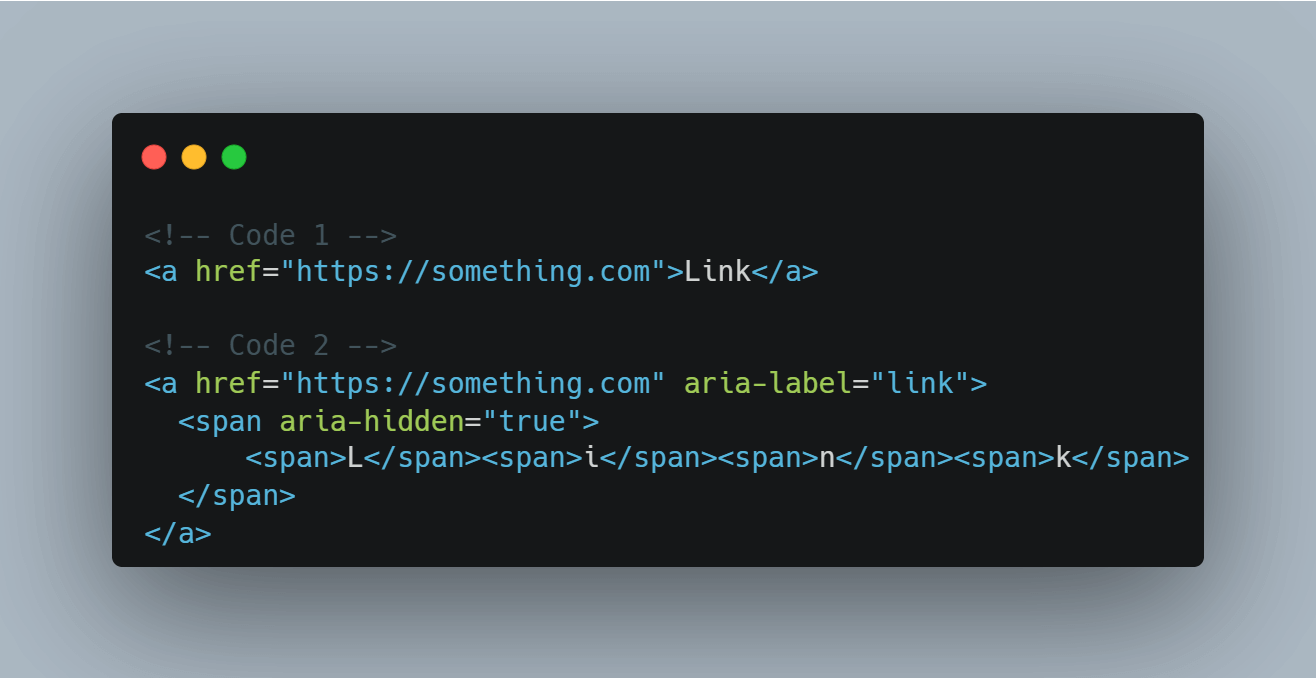
Today Temani Afif asked a question: Are the below codes equivalent if we consider all the aspects? (a11y, semantic, something else maybe?) If not, what is missing (or should be changed) in the second code CSS by T. Afif (@css@front-end.social) 22 January 2026, 2:52pm I have my canned response that…
Today Temani Afif asked a question:
CSS by T. Afif (front-end.social) 22 January 2026, 2:52pm
Are the below codes equivalent if we consider all the aspects? (a11y, semantic, something else maybe?)
If not, what is missing (or should be changed) in the second code
CSS by T. Afif :verified: (@css@front-end.social)
Attached: 1 image Are the below codes equivalent if we consider all the aspects? (a11y, semantic, something else maybe?) If not, what is missing (or should be changed) in the second code #CSS #HTML #A11y
But the something else maybe question is what reminded me that this construct has caused issues outside of WCAG concerns. In particular, the only assistive technologies (AT) that consume ARIA are screen readers and, to a far lesser extent, voice control. That latter part only because browsers assemble the accessible names, not AT. There’s plenty more AT that never touches ARIA.
I knew there were issues, but couldn’t rattle them off from the top of my head. So I built some examples and poked them with other accessibility features of browsers.
I am not testing screen readers nor voice control.
The text with each letter in its own span does not auto-translate..
Edge’s Read Aloud feature (Ctrl+Shift+U) does not announce the aria-label value of any link.
Edge’s Read Aloud feature does not announce the links with aria-hidden, regardless of other attributes.
Chrome’s reader mode text-to-speech does not announce the aria-label value of any link.
Chrome’s reader mode text-to-speech does not announce the links with aria-hidden, regardless of other attributes.
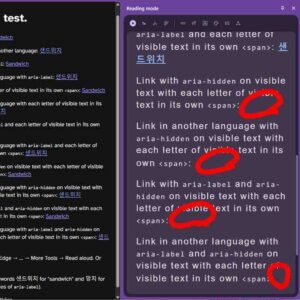
Chrome’s reader mode visually hides every link with aria-hidden.
Firefox’s reader mode visually hides every link with aria-hidden.
Firefox’s reader mode visually styled every link that spanned its letters as white instead of blue or purple.
Safari’s Speech feature jumps past most of the page when it gets to the first instance of letters split across spans, and announces subsequent links with the wrong link text (using the Korean text for English links).
Safari’s Speech feature does not announce the aria-label value of any link.
Safari’s Speech feature does not announce the span-separated letters nor visible word they make up.
Chrome and Edge would not let me link to the highlighted text when I highlighted the aria-hidden links, though that changed when I got more content on the page.
As Amelia Bellamy-Royds points out, the text-to-speech features seem to respect the aria-hidden but ignore the aria-label — and by extension the accessible name the browser provides in the accessibility tree.
Takeaways
Three key takeaways here (yes, I know your use case is special):
Don’t use aria-label on links;
Don’t use aria-hidden within links;
Don’t split the letters of a word across elements.
I look forward to you, dear reader, trying other approaches and letting me know where these fall down (or what I got wrong). I don’t need to know where they are supported. Just the gaps.
These are the tests I used to generate the results you just read (originally as a Codepen (aardrian)). You can ignore this part unless you want to run your own tests. If you want to find other ways these approaches might break for users, then please do so.
I used the Korean words 샌드위치 for “sandwich” and 망치 for “hammer” (the values of aria-label).
The links with aria-label all fail WCAG SC 2.5.3 Label in Name, but it’s intentional so I can quickly tell if the aria-label is exposed. Similarly, the links with aria-hidden and no aria-label fail 4.1.2 Name, Role, Value, but again I wanted to see how they performed.