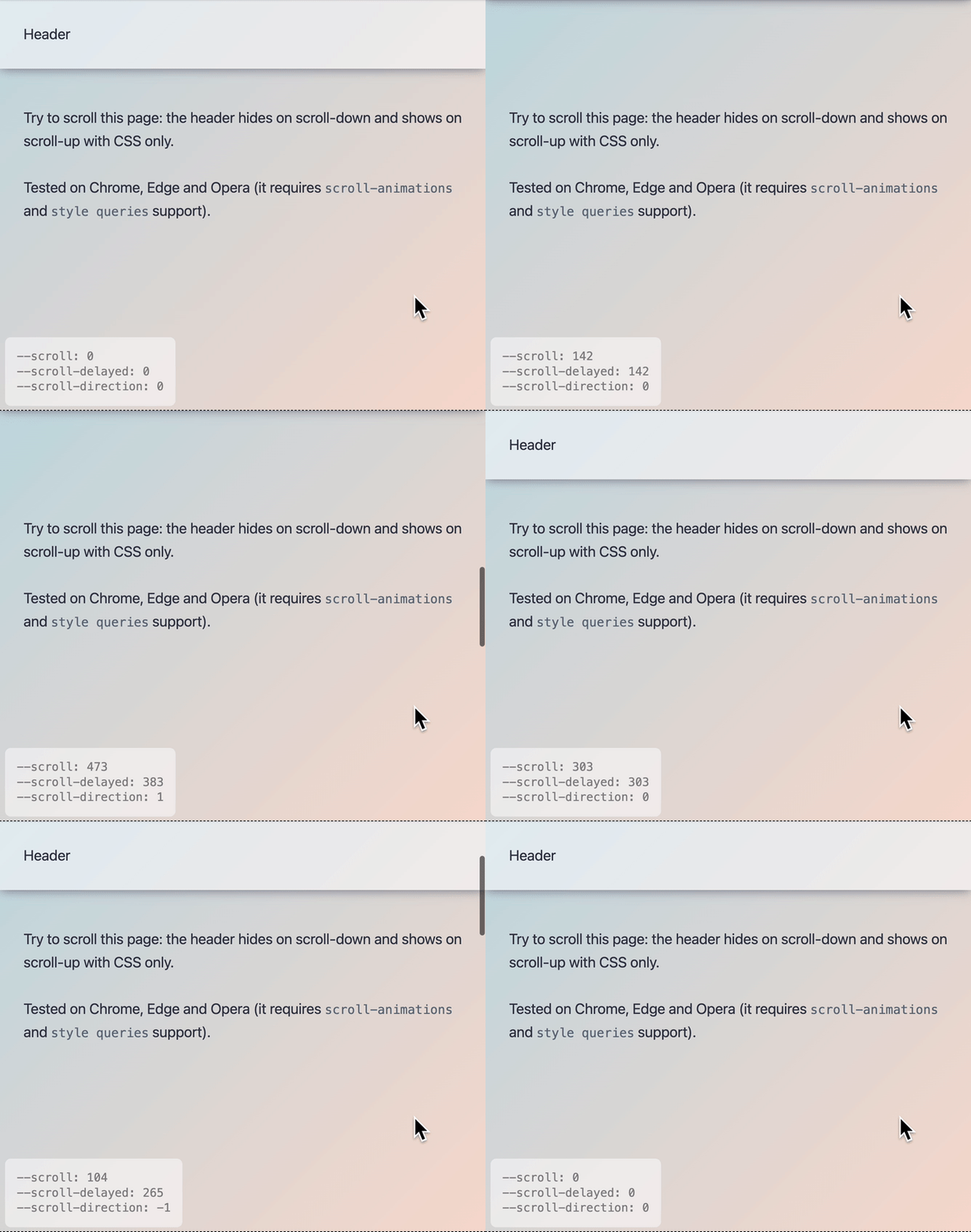
Solved by CSS Scroll-Driven Animations: hide a header when scrolling down, show it again when scrolling up.
Solved by CSS Scroll-Driven Animations: hide a header when scrolling down, show it again when scrolling up. 관련

By adding a long transition-delay to a CSS property under certain conditions (which you can do using a Style Query), you can persist its value after the condition no longer applies.
UPDATE 2025.10.22
Thanks to scrolled scroll-state queries, this hack is no longer needed. Go check the updated code over at https://brm.us/hidey-bar-2
Detecting the Scroll-Direction with CSS Scroll-Driven Animations
One of the demos that I built as part of the “Solved by CSS Scroll-Driven Animations: Style an element based on the active Scroll Direction and Scroll Speed” article is a header element that hides itself on scroll.
Here’s the demo I’m talking about: as you scroll up or down, the header hides itself. When idling, it comes back into view. Check it out using a Chromium-based browser, as those – at the time of writing – are the only browsers to support Scroll-Driven Animations.
In the code of that demo there are few CSS variables that are either 0 or 1 when scrolling – or not-scrolling – when scrolling in a certain direction. The CSS looks like this:
--when-scrolling: abs(var(--scroll-direction));
--when-not-scrolling: abs(var(--when-scrolling) - 1);

--when-scrolling-up: min(abs(var(--scroll-direction) - abs(var(--scroll-direction))), 1);
--when-scrolling-down: min(var(--scroll-direction) + abs(var(--scroll-direction)), 1);

--when-scrolling-down-or-when-not-scrolling: clamp(0, var(--scroll-direction) + 1, 1);
--when-scrolling-up-or-when-not-scrolling: clamp(0, abs(var(--scroll-direction) - 1), 1);
💁♂️
If you want to know exactly how it works, go check out episode 9 of the free video course “Unleash the Power of Scroll-Driven Animations” I made, which teaches you all there is to know about Scroll-Driven Animations. The episode is also right here:
The transition-delay trick
As I had noted in the article, these variables are fleeting. From the moment you stop scrolling, all those variables – except --when-not-scrolling – become 0 again. Therefore, the header in the example will reveal itself again once you stop scrolling. A better experience would be to hide the header when scrolling down and to keep it that way until the moment you scroll up again. However, I didn’t find a solution to do that back then.
Fast forward to a few months later. While at CSS Day 2024, Schepp shared that he found way to make those custom properties “sticky”. His trick? Adding a long transition-duration to the properties when scrolling in a certain direction.
In the following snippet, the transition is stalled indefinitely when idling. That way, the --scroll-* custom properties will retain their value until you start scrolling again.
@container style(--scroll-direction: 0) {
   header {
      transition-delay: calc(infinity * 1s);
   }
}
Putting it all together
Unfortunately I hadn’t found the time to actively use Schepp’s suggestion in the hiding header demo ever since we discussed it (but I did use it for my @starting-style feature detection technique).
Fast forward to just last week, and Fabrizio Calderan reached out on X (fcalderan) to share his “Hide on Scroll Down, Show on Scroll Up Header” CodePen ()
Fabrizio came to creating the same trick Schepp had suggested to me, by relying on a long transition-behavior which he sets in a Style Query:
@container style(--scroll-direction: 0) {
   /* Scroll is idle, so we keep the current header position by setting the transition-delay to infinity */
   header {
      transition-delay: calc(infinity * 1s);
   }
}


@container style(not (--scroll-direction: 0)) {
   /* page is scrolling: if needed, the animation of the header should run immediately */
   header {
      transition-delay: 0s;
   }
}

@container style(--scroll-direction: -1) {
   /* Scrolling up, so we must reveal the header */
   header {
      --translate: 0;
   }
}

@container style(--scroll-direction: 1) {
   /* Scrolling down, so we must hide the header */
   header {
      --translate: -100%;
   }
}
Nice one, Fabrizio!
When trying it out, you’ll notice it still is not 100% perfect though, as you can end up in situation where the header remains hidden when starting a scroll down immediately followed by a scroll up. This confirms to me that there still is a need to have the scroll-direction be exposed by the browser itself (w3c/csswg-drafts), instead of needing to rely on a hack powered by Scroll-Driven Animations. The current line of thinking is to use a Scroll-State Style Query for this.