max-width + centering with one instruction
12/10/21About 1 minCSSArticle(s)blogcss-tip.comcss
max-width + centering with one instruction 관련

CSS > Article(s)
Article(s)
Set max-width and center your block element with one CSS declaration using margin-inline and max().
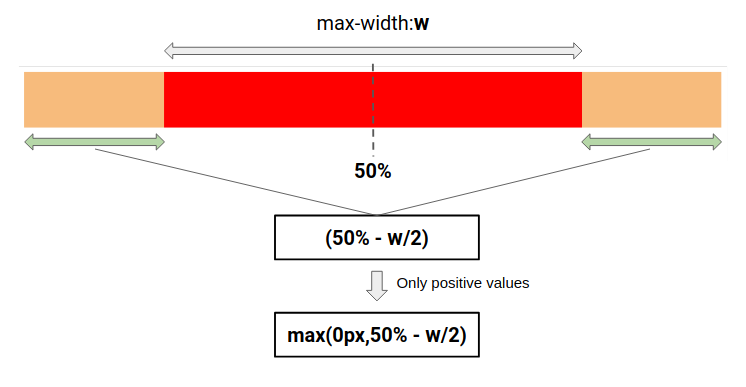
max()margin-inline: max(0px,50% - 800px/2);
You can also set a minimum margin for small screen by replacing 0px with any value
margin-inline: max(1rem,50% - 800px/2);
See margin-inline by t_afif on CodePen.
More CSS Tips

Cut your image into pieces
Use CSS mask to cut your image into small pieces
One big image + thumbnails
A CSS grid with a big image and thumbnails
Multi-line text decoration
Use CSS gradients to decorate your text
- Circular dashed border Use mask and gradient to create a fancy dashed border. November 25, 2021
max-width + centering with one instruction
Use max() to center your element and set a max-width