How to correctly use steps() with animations
11/18/24About 1 minCSSArticle(s)blogcss-tip.comcss
How to correctly use steps() with animations 관련

CSS > Article(s)
Article(s)

How to correctly use steps() with animations
The default behavior of steps() is not intuitive so learn how to use it correctly
You want to create a discrete animation using steps() but you struggle with its value, right? You never know how many steps it requires and it never works as expected!
In most cases, adding an extra value will fix your issue.
/* Don't ❌ */
.element {
  animation: anime 3s steps(3);
}
/* Do  ✅ */
.element {
  animation: anime 3s steps(3,jump-none);
}
By default, steps() uses jump-end which is not very intuitive. The behavior you are looking for is the one of jump-none
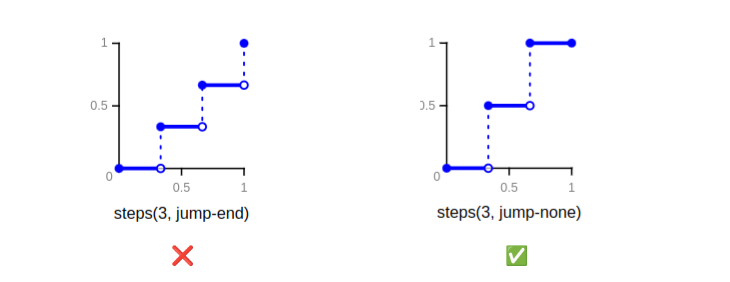
steps() functionHere is a demo with some common examples (see the comments in the CSS code)
See Using steps(N,jump-none) by t_afif on CodePen.
More CSS Tips
- Border-only breadcrumb shape using modern CSS A few lines of code to create a border-only breadcrumb shape that you can easily adjust. December 05, 2024
- Glowing border animation with a smooth stop Add a fancy border animation on hover that stops smoothly on mouseout. December 03, 2024
- Get the scrollbar width using only CSS A few lines of code to get the scrollbar width within a CSS variable. November 14, 2024
- Folded rectangle shapes using CSS mask Create a folded rectangle shape with minimal code and a subtle 3D effect. November 08, 2024
How to correctly use steps() with animations
The default behavior of steps() is not intuitive so learn how to use it correctly